Odoo Website Development Guide: Build Business Websites with Odoo
Build scalable business websites, customer portals, and e-commerce stores using the Odoo website builder — what it does, when to choose it, and how to ship.
Businesses today don't just need a website. They need a connected digital system that works with sales, inventory, CRM, customer support, marketing, and operations together. That's where Odoo website development becomes extremely useful.
Odoo is not only a powerful ERP platform but also a flexible Odoo website builder that helps businesses create feature-rich websites without depending on disconnected third-party systems.
Whether it's a company website, customer portal, eCommerce store, booking platform, or service portal, Odoo web development allows businesses to build everything inside one ecosystem.
The biggest advantage? Your website directly connects with ERP workflows in real time. Orders, inventory, leads, payments, and customer data stay synced automatically. That makes operations faster, cleaner, and much easier to scale as the business grows.
If you are planning to create a website with Odoo, this blog is for you. It provides in-depth information to help you build the website and offer insights on why Odoo is the right fit for business websites. For application-side topics, see our Odoo App Development guide.
Why Odoo for website development?
Odoo is an open-source drag-and-drop no-code website development platform that removes the friction in creating and managing websites. Apart from being an ERP, it works as a fully integrated CMS (Content Management System).
According to BuiltWith Odoo CMS Trends, thousands of websites globally already use Odoo for business website management and digital operations.
Fully integrated business ecosystem
One of the biggest advantages of Odoo website development is integration. Most websites operate separately from inventory, CRM, accounting, or sales systems. Odoo works differently. Everything stays connected inside one platform. Leads from the website directly enter CRM. Orders update inventory automatically.
Customer information syncs across departments in real time. This reduces duplicate work and operational confusion. Businesses using Odoo development usually spend less time managing disconnected software tools and manual data transfers.
Drag-and-drop website builder
The Odoo website builder makes website management much simpler for non-technical teams. Businesses can create pages, edit layouts, update content, and manage products without heavy coding knowledge. The drag-and-drop interface speeds up design changes and daily updates.
This flexibility becomes useful for marketing teams that regularly launch landing pages, campaigns, or seasonal updates. Odoo website development gives businesses more control internally instead of depending on developers for every small website change.
Strong eCommerce capabilities
Odoo web development works especially well for businesses planning to combine ERP and eCommerce together. Products, inventory, pricing, payments, shipping, and customer orders stay connected automatically. Businesses do not need multiple plugins or third-party integrations just to run an online store properly.
The platform also supports product variants, subscriptions, customer portals, coupons, and automated workflows. For growing businesses, this creates a much cleaner operational structure compared to managing separate website and ERP systems.
Open-source flexibility and customization
Because Odoo is open-source, businesses get much more flexibility during customization. Developers can modify workflows, create custom features, integrate third-party systems, and build industry-specific functionality more easily. This makes Odoo web development useful for businesses with unique operational requirements.
Unlike rigid website platforms, Odoo allows companies to shape the system around how they actually operate. That flexibility becomes very important once businesses start scaling and standard website tools stop fitting operational needs properly.
Better scalability for growing businesses
Many businesses outgrow their website platform after a few years. Odoo website development helps avoid that problem because the platform scales gradually with operations.
Companies can start with a simple website, then later add CRM, eCommerce, customer portals, automation, marketing tools, and other modules without rebuilding the entire system again. This makes the Odoo website builder especially useful for startups, SMBs, distributors, service providers, and fast-growing businesses planning long-term digital expansion.
What websites you can create with Odoo website builder
One of the biggest advantages of website development with Odoo is flexibility. Businesses are not limited to only basic company websites. The platform supports everything from simple landing pages to fully integrated business portals.
Many companies even start with a basic website and gradually expand into eCommerce, bookings, customer portals, and automation later. That scalability makes Odoo website development useful for both startups and growing enterprises.
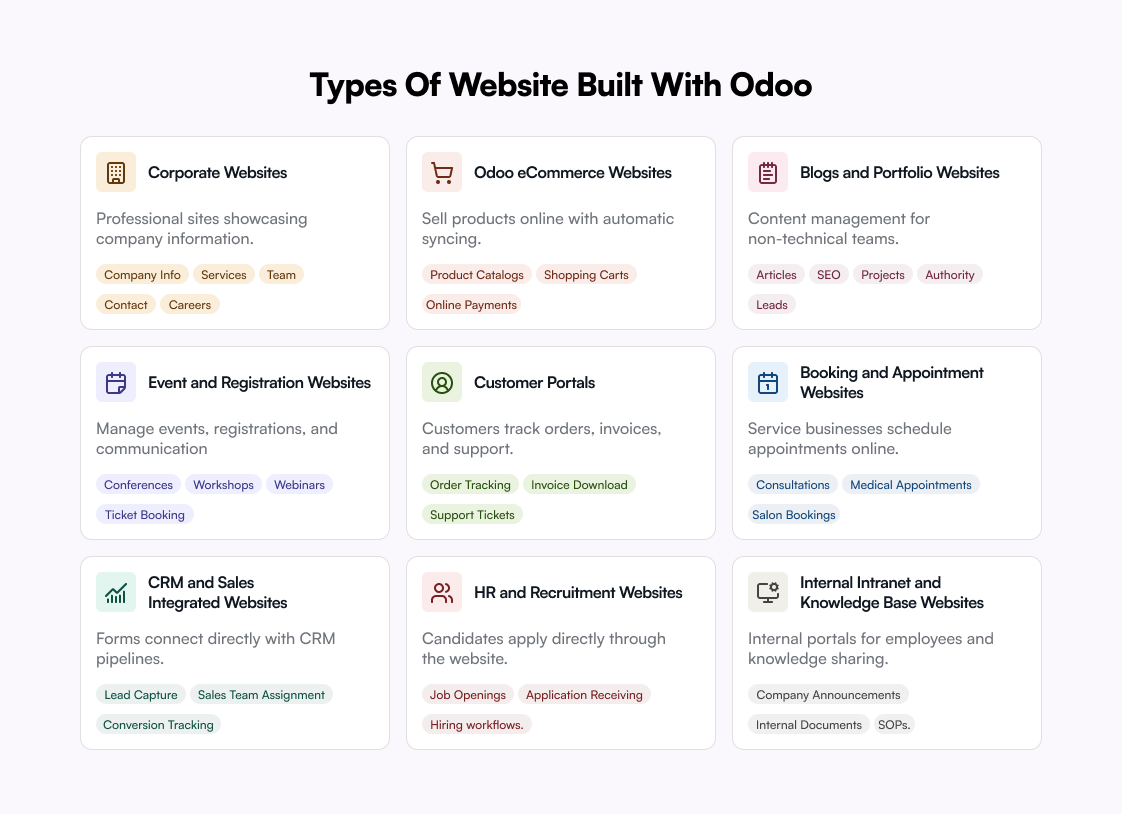
Corporate websites
Businesses can create professional corporate websites to showcase company information, services, team profiles, contact pages, and careers. These websites help businesses build credibility.
Odoo eCommerce websites
Odoo ecommerce websites allow businesses to sell products directly online while syncing inventory, payments, shipping, and orders automatically. This removes much of the manual work that usually happens between eCommerce and backend systems.
Features usually include product catalogs, shopping carts, online payments, coupons and discounts, customer accounts, and real-time inventory updates.
Blogs and portfolio websites
Businesses, agencies, creators, and consultants can use the Odoo website builder for blogs and portfolios. The built-in CMS also makes content management much easier for non-technical teams. These websites are useful for publishing articles, SEO content marketing, showcasing projects, building authority, and generating leads.
Event and registration websites
Odoo also supports event websites for conferences, workshops, webinars, corporate events, and ticket booking. Businesses can manage registrations, attendee information, invoices, and communication directly from the same platform.
Customer portals
Customer portals are one of the strongest Odoo website examples for operational efficiency. Businesses can create portals where customers can track orders, download invoices, raise support tickets, view subscriptions, and access documents.
Booking and appointment websites
Service businesses can create booking websites for consultations, medical appointments, salon bookings, rentals, and professional services. Customers can schedule appointments online while calendars, invoices, and CRM records sync internally.
CRM and sales integrated websites
Website development with Odoo becomes more powerful because forms, chats, and inquiries connect directly with CRM pipelines. This reduces manual lead management significantly. Businesses can capture leads automatically, assign sales teams, track conversions, and automate follow-ups.
HR and recruitment websites
Businesses can also build recruitment portals where candidates apply directly through the website. Everything stays centralized inside Odoo, helping HR teams publish job openings, receive applications, track hiring workflows, and manage interviews.
Internal intranet and knowledge-base websites
Apart from public websites, businesses can create internal portals for employees. Many companies even create a website free with Odoo initially before expanding into more advanced internal systems later — useful for company announcements, internal documents, SOPs, training resources, and knowledge sharing.
Key features of Odoo for website development
Drag-and-drop website editor
The Odoo website builder comes with a visual drag-and-drop editor that makes page creation much easier. Teams can edit sections, banners, text blocks, forms, and layouts directly on the page itself. This reduces dependency on developers for small daily website changes.
Inline content editing
Unlike many CMS platforms, Odoo allows inline editing directly from the live page view. Businesses can update text, buttons, images, or product sections without switching between backend panels constantly. It feels simpler and faster during day-to-day content management.
Built-in multi-website management
Odoo supports managing multiple websites from one backend. Businesses operating different brands, regions, or languages can control everything centrally. This becomes useful for growing companies managing separate domains while keeping workflows more organized internally.
Dynamic snippet system
The snippet-based design system allows reusable website blocks across pages. Businesses can create custom banners, CTA sections, testimonials, pricing layouts, or service blocks once and reuse them repeatedly. This speeds up Odoo website design consistency and reduces repetitive editing work.
Advanced website permissions
Odoo offers granular permission controls for website content management. Different employees can get different editing rights depending on their responsibilities. This becomes useful for larger teams where content, design, and publishing workflows are handled by separate departments.
Built-in A/B testing features
Businesses can test multiple versions of web pages, banners, or call-to-actions directly inside the Odoo website builder. This helps improve conversions without depending heavily on third-party testing tools.
Smart mobile optimization
Odoo websites automatically adapt across desktops, tablets, and mobile devices. Businesses can also preview layouts separately for different screen sizes before publishing. This helps teams identify spacing or usability issues early during website development with Odoo.
Native blogging and content scheduling
The platform includes built-in blogging with scheduling features. Businesses can prepare articles in advance and publish automatically later. This becomes very useful for SEO campaigns, product launches, seasonal promotions, and long-term content planning workflows.
Version tracking and content recovery
Odoo keeps track of website modifications and content changes over time. Teams can review edits or restore earlier versions when needed. This reduces the risk of losing important content accidentally during redesigns or team collaboration activities.
Custom animation and interactive blocks
Modern websites often need lightweight animations and interactive sections. Odoo supports dynamic effects, hover interactions, scrolling behavior, and visual transitions without requiring heavy frontend development. This helps businesses create more engaging user experiences with less complexity.
Customizable templates and themes
Businesses can start quickly using prebuilt Odoo website templates and later customize layouts, colors, headers, menus, and page structures based on branding needs. Odoo theme development allows them to create fully custom website experiences instead of forcing businesses into rigid template limitations.
How to build an Odoo website: step-by-step guide
Building a website with Odoo is much easier compared to many traditional platforms. The system combines website design, content management, eCommerce, and business functionality inside one dashboard. Here's how businesses usually approach Odoo website development.
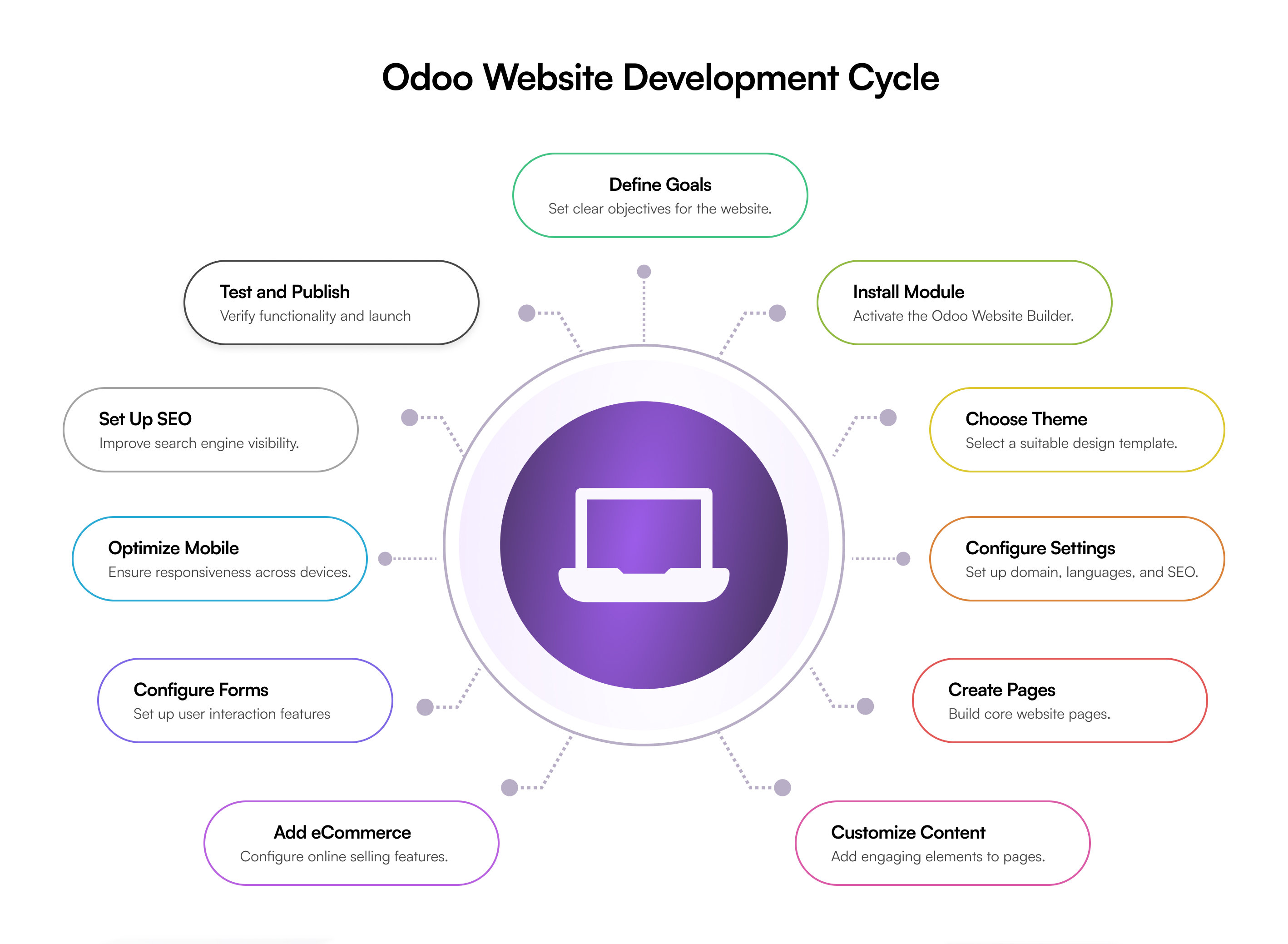
1. Define your website goals
Before starting Odoo website development, businesses should first define what they actually want the website to achieve. Some companies only need a professional business website. Others may need booking systems, customer portals, blogs, or fully functional Odoo ecommerce websites.
Clear goals help decide website structure, required features, design approach, user journeys, and future scalability needs. This planning stage prevents unnecessary redesigns and keeps the Odoo website builder setup more organized from the beginning itself.
2. Install the website module
Start by installing the Website app inside Odoo. This activates the Odoo website builder and gives access to themes, page editors, menus, and website settings.
3. Choose a website theme
Select a suitable design from available Odoo website templates. Businesses can customize colors, fonts, layouts, headers, and navigation later according to branding requirements.
4. Configure website settings
Set up domain name, languages, SEO settings, contact information, and navigation menus. Proper configuration improves both usability and search visibility.
5. Create core website pages
Build important pages like Home, About Us, Services, Products, Contact, and Blog. The drag-and-drop editor helps teams create pages quickly without heavy coding.
6. Customize layout and content
Add banners, forms, buttons, images, videos, testimonials, and CTA sections using reusable website snippets. This helps businesses create more engaging website experiences.
7. Add eCommerce features
For Odoo ecommerce websites, configure products, pricing, payment gateways, shipping methods, taxes, and checkout pages. This enables online selling directly from the website.
8. Configure forms and customer features
Businesses can add contact forms, appointment booking, customer login portals, newsletter subscriptions, and event registrations. These features improve user interaction and lead generation.
9. Optimize for mobile devices
Preview the website across desktop, tablet, and mobile screens. Adjust spacing, images, and layouts to improve mobile usability before launch.
10. Set up SEO and analytics
Configure meta titles, URLs, image alt tags, redirects, and analytics tools. Strong SEO setup helps improve rankings and website traffic over time.
11. Test and publish the website
Before going live, test forms, checkout flows, mobile responsiveness, website speed, and broken links. Once everything works properly, publish the website and monitor performance regularly.
Cost of Odoo website development
The cost of Odoo website development varies depending on website complexity, customization level, business requirements, and integrations. A simple company website usually costs much less compared to large Odoo ecommerce websites with custom workflows, portals, or automation features.
Businesses also need to consider hosting, theme customization, third-party apps, maintenance, and ongoing support while estimating total project cost.
Here's a rough idea:
| Website type | Estimated cost range |
|---|---|
| Basic business website | $1,500 – $5,000 |
| Custom corporate website | $5,000 – $12,000 |
| Odoo eCommerce website | $8,000 – $25,000+ |
| Customer portal or booking website | $10,000 – $30,000+ |
| Fully custom Odoo web development project | $25,000+ |
The actual cost depends heavily on how customized and scalable the website needs to become over time.
Factors affecting the cost to develop an Odoo website
- Website complexity — simple informational websites cost less. Advanced portals, booking systems, or large Odoo ecommerce websites increase development time and budget significantly.
- Custom design requirements — using prebuilt Odoo website templates is cheaper. Fully custom UI/UX design and Odoo theme development usually increase development costs.
- Number of website pages — a small 5-page business site costs much less compared to websites with hundreds of pages, product catalogs, blogs, or multilingual content.
- Custom features and functionality — features like appointment booking, subscriptions, advanced search, dynamic forms, calculators, or customer dashboards increase development effort.
- Third-party integrations — connecting external tools, APIs, payment systems, marketing software, or shipping providers can increase overall Odoo web development cost.
Odoo vs other website builders: a brief comparison
Businesses often compare Odoo with platforms like WordPress, Wix, and Squarespace before deciding which website builder fits their needs. The right choice usually depends on business size, customization requirements, scalability, and operational complexity.
Odoo vs WordPress
WordPress is extremely popular because of its massive plugin ecosystem and flexibility for content-heavy websites. It works very well for blogs, publishing, SEO-focused websites, and businesses needing thousands of third-party plugins.
Odoo website development, however, works better for businesses wanting website operations managed inside one connected system. Odoo is usually stronger for eCommerce workflows, portals, bookings, and operational automation without depending heavily on external plugins.
Odoo vs Wix
Wix is easier for beginners and small businesses wanting a quick website with minimal setup. Its drag-and-drop builder feels simple and beginner-friendly. Small portfolio websites or basic company websites can go live very fast on Wix.
Odoo web development becomes more useful when businesses need scalability, custom workflows, advanced functionality, or large operational websites. Odoo also offers more flexibility for customization compared to Wix's relatively closed ecosystem.
Odoo vs Squarespace
Squarespace is known for modern templates and strong visual design. It works especially well for creatives, photographers, restaurants, and businesses focused heavily on aesthetics and branding simplicity.
Odoo website builder performs better for businesses needing operational functionality beyond visual presentation. Customer portals, booking systems, product management, dynamic workflows, and large Odoo ecommerce websites are areas where Odoo usually becomes more practical long term.
Build your Odoo website with Galaxy Weblinks
A good website should not only look professional. It should also support real business operations behind the scenes. That's where Galaxy Weblinks helps businesses with reliable Odoo web development services tailored around practical business goals.
From corporate websites and portals to large Odoo ecommerce websites, our experienced Odoo website developers help businesses build scalable, user-friendly, and high-performing digital experiences. We also provide custom development, theme customization, third-party integrations, and long-term support to help businesses grow without rebuilding systems again later.
Final thought
Odoo website development gives businesses much more than a basic website builder. It helps create scalable websites, customer portals, booking systems, and eCommerce experiences inside one flexible platform.
From drag-and-drop design tools to advanced customization, Odoo works well for both growing startups and established businesses. The real advantage comes from flexibility and long-term scalability.
With the right planning and development approach, businesses can build websites that not only look modern but also support real operational growth over time.
Common questions
Can you build a website with Odoo?
Yes. Odoo includes a built-in website builder for creating business websites, eCommerce stores, blogs, and landing pages.
Is Odoo website builder free?
Odoo offers a free plan with basic website features, while advanced tools and apps require paid plans.
Is Odoo built on Python or PHP?
Odoo is primarily built using Python for backend development along with PostgreSQL and XML frameworks.
What are the limitations of Odoo?
Odoo may require customization, technical expertise, and ongoing maintenance for complex business requirements.
How much does Odoo cost?
Odoo pricing depends on the selected apps, number of users, hosting type, and customization requirements.