

Creating professional-quality videos no longer requires hours of manual editing or advanced technical skills. With AI transforming the video production landscape, businesses can automate repetitive editing tasks, improve production speed, and deliver engaging content at scale.
Whether you’re planning a creator-focused platform, a marketing solution, or an enterprise video tool, partnering with an experienced AI video editing app development company can help you build a scalable product with the right AI capabilities from day one.
In this guide, you’ll learn how AI video editing app development works, the technologies behind them, their core features, system architecture, development costs, and the key factors to consider before starting your project.
Key Takeaways
- AI-powered video editing can reduce editing time from hours to just a few minutes by automating repetitive tasks.
- Modern platforms combine technologies such as computer vision, large language models (LLMs), speech recognition, and generative AI to create intelligent editing experiences.
- Cloud infrastructure and GPU-powered processing are essential for handling rendering, transcoding, and AI inference at scale.
- Development costs depend more on AI capabilities, processing requirements, and integrations than on interface design alone.
- Building a focused MVP first allows businesses to validate demand before investing in advanced enterprise features.
- Choosing the right AI video editing development partner significantly impacts product quality, scalability, and long-term maintenance.
What Is an AI Video Editing App?
An AI video editing app uses artificial intelligence to analyze, edit, and enhance videos with minimal human intervention. Instead of manually trimming clips, adding subtitles, or identifying key moments, AI automates these tasks using technologies such as machine learning, computer vision, and natural language processing.
AI accelerates the workflow for video editing apps…
Traditional video editing software requires users to perform almost every editing task manually. AI-assisted editors accelerate the workflow by suggesting edits, generating captions, detecting scenes, and removing background noise.
The latest generation of AI-powered platforms goes even further by creating highlights, generating voiceovers, recommending transitions, and producing complete videos from text prompts.
Many popular platforms already demonstrate how AI is transforming video production, including Runway, CapCut, Adobe Premiere Pro, Descript, and VEED. An experienced AI video editing app development company can build similar capabilities while tailoring the platform to your business goals and user requirements.
Why Businesses Are Investing in AI Video Editing Apps
Video has become the preferred format for marketing, education, sales, and customer engagement. As businesses produce more video content across multiple channels, manual editing quickly becomes expensive, time-consuming, and difficult to scale.
The rise of the creator economy, user-generated content (UGC), short-form platforms like TikTok, Instagram Reels, and YouTube Shorts, along with enterprise training and internal communications, has significantly increased the demand for intelligent editing solutions.
The demand for video editing apps is increasing…
Indeed, the demand for video editing apps is rising significantly with the market size standing at USD 3.75 billion in 2025, according to Mordor Intelligence.
According to industry reports from Cisco, video continues to account for the majority of internet traffic, while businesses increasingly rely on video to improve engagement, training, and customer education. AI helps meet this demand by reducing production time, maintaining consistency, and enabling teams to publish more content with fewer resources.
Consequently, businesses’ investments in video editing apps are rising. Whether you’re building a SaaS product, an enterprise solution, or a consumer application, working with an experienced AI video editing developer ensures your platform is designed for performance, scalability, and future AI innovation.
How Does an AI Video Editing App Work?
Although AI-powered editing appears seamless to users, multiple technologies work together behind the scenes to analyze and process every video.
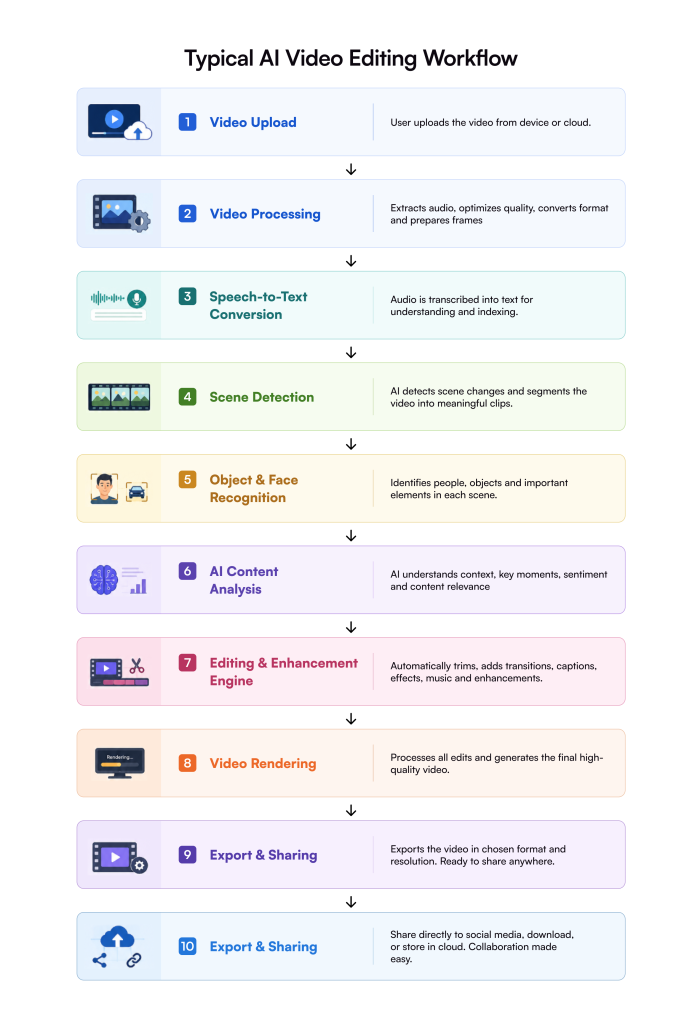
Typical AI Video Editing Workflow
Once a user uploads a video, the system preprocesses the media by optimizing quality and extracting audio and visual data.
AI models then generate transcripts, identify scenes, recognize people and objects, and understand the video’s context.
Based on this analysis, the editing engine can automatically trim footage, add captions, remove silence, apply transitions, recommend music, and optimize the final output before rendering and exporting the completed video.
This intelligent workflow enables businesses to deliver professional-quality editing experiences with minimal manual effort.
Core AI Technologies Behind Video Editing
Behind every intelligent video editor is a combination of AI models working together to understand, process, and enhance video content. Instead of relying on a single algorithm, modern platforms combine computer vision, speech processing, natural language understanding, and generative AI to automate complex editing tasks. Choosing the right technologies is one of the most important decisions an AI video editing app development company makes when building scalable, production-ready solutions.
Computer Vision
Computer vision enables AI to “see” and interpret visual content frame by frame. It helps applications understand what appears in a video without manual tagging.
Key capabilities include:
- Object detection to identify products, vehicles, animals, and other objects.
- Face recognition for identifying people and tracking presenters throughout a video.
- Object tracking to keep subjects centered while applying effects or camera movements.
- Scene segmentation to automatically split long videos into meaningful clips.
Libraries such as OpenCV, MediaPipe, YOLO, and Meta’s Segment Anything Model (SAM) power many of these capabilities.
Speech Recognition
Audio is just as valuable as visuals. Speech recognition converts spoken words into searchable text that AI can understand and edit.
Common applications include:
- Automatic subtitle and caption generation.
- Accurate audio transcription for podcasts and interviews.
- Speaker recognition for identifying multiple speakers in a conversation.
- Voice activity detection for removing silence and filler words.
Popular speech AI solutions include OpenAI Whisper, Google Speech-to-Text, and Azure AI Speech.
Natural Language Processing (NLP)
Once speech becomes text, NLP helps the application understand its meaning and context.
It enables features such as:
- AI-generated captions and titles.
- Automatic script generation.
- Language translation for multilingual audiences.
- Video summarization and chapter creation.
Large language models like GPT, Gemini, and Claude can also recommend edits based on user prompts, making the editing process more conversational.
Generative AI
Generative AI goes beyond editing existing footage by creating entirely new assets that enhance the final video.
Examples include:
- AI-generated B-roll footage.
- Voice cloning for narration.
- Background music generation.
- AI avatars for presentations and training videos.
- AI-generated images and visual assets.
Platforms such as Runway, Adobe Firefly, ElevenLabs, and Stable Diffusion have accelerated the adoption of generative video workflows.
Recommendation Engine
One of the biggest advantages of AI is its ability to recommend edits rather than waiting for user input.
A recommendation engine analyzes viewing patterns, engagement signals, and video structure to automatically suggest:
- Better video cuts.
- Highlight moments.
- High-performing thumbnail frames.
- Editing styles based on content type.
- Social media optimization recommendations.
These intelligent recommendations improve productivity while helping creators publish more engaging content.
Types of AI Video Editing Applications
Not every AI video editor serves the same audience. The required features, infrastructure, and AI models vary depending on the business use case. An experienced AI video editing development partner helps define the right product strategy before development begins.
Consumer Video Editing Apps
Designed for everyday users who want fast editing with minimal technical knowledge.
Typical use cases include:
- Short-form videos
- Family memories
- Travel vlogs
- Social media content
Professional Editing Platforms
Built for filmmakers, production agencies, and creative teams that require advanced editing, collaboration, and rendering capabilities.
Social Media Video Editors
Optimized for platforms like TikTok, Instagram Reels, YouTube Shorts, and Facebook with AI-powered templates, automatic resizing, captions, and trend-based editing.
Marketing & Brand Content Platforms
Help businesses create advertisements, product demonstrations, promotional campaigns, and personalized marketing videos using AI automation.
Corporate Training Solutions
Used by enterprises to create onboarding materials, compliance training, product demonstrations, and internal communications with consistent branding.
Podcast & Interview Editors
Automatically remove silence, identify speakers, generate transcripts, and create short promotional clips for social media.
Educational Video Platforms
Generate subtitles, chapter summaries, quizzes, multilingual translations, and searchable learning content for students and educators.
Must-Have Features for AI Video Editing App Development
The right feature set depends on your audience, but every successful AI-powered platform balances usability, intelligent automation, and enterprise scalability.
User Features
These features create a seamless editing experience for creators and business users alike.
Essential capabilities include:
- AI-powered video trimming
- Automatic captions and subtitles
- Text-to-video generation
- Voice commands
- Background removal
- AI noise reduction
- Automatic color correction
- Smart transitions
- Ready-made editing templates
- Multi-format export
- Team collaboration
- Version history
- Cloud synchronization
AI Features
These capabilities differentiate intelligent video editors from traditional editing software.
Key AI features include:
- Automatic scene detection
- Emotion recognition
- Silence removal
- AI-powered auto zoom
- Object tracking
- Smart video cropping
- Auto highlight generation
- Content moderation
- Multi-language dubbing
- AI-generated B-roll
An experienced AI video editing developer carefully selects AI models based on the product’s performance, accuracy, and infrastructure requirements.
Enterprise Features
Enterprise platforms require much more than intelligent editing.
Business-focused features typically include:
- Role-based access control
- Approval workflows
- Analytics dashboards
- Secure cloud storage
- Third-party API integrations
- Single Sign-On (SSO)
- Compliance and audit logging
These features ensure organizations can manage large teams while maintaining security and regulatory compliance.
AI Video Editing App Architecture
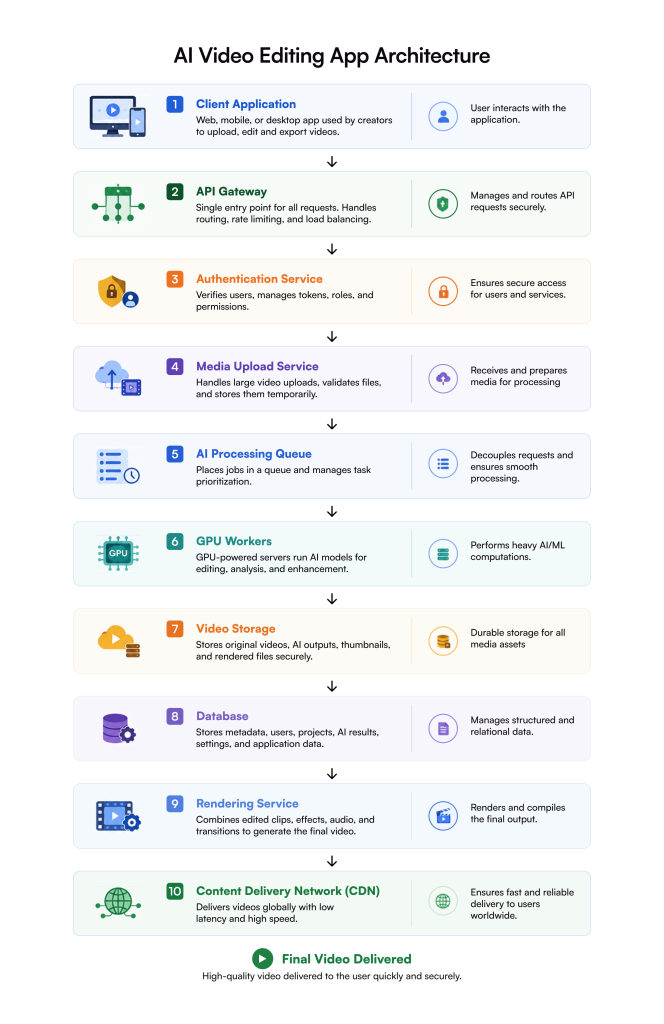
A production-ready AI video editing platform consists of multiple services working together. Separating responsibilities into different layers improves scalability, performance, and reliability.
Client Application
This is the web, desktop, or mobile application where users upload videos, edit projects, and export content.
API Gateway
Acts as the central entry point for every request, handling authentication, routing, rate limiting, and API management.
Authentication Service
Manages user accounts, permissions, OAuth, JWT tokens, and secure login processes.
Media Upload Service
Handles large video uploads, validates media files, compresses content when needed, and transfers assets to cloud storage.
AI Processing Queue
Instead of processing every request immediately, jobs are placed into a queue where AI services process them asynchronously, improving scalability and preventing system bottlenecks.
GPU Workers
GPU servers execute computationally intensive AI models such as Whisper, YOLO, PyTorch, and TensorFlow, dramatically reducing processing time.
Video Storage
Stores original footage, intermediate assets, rendered outputs, thumbnails, and AI-generated media using services like Amazon S3, Azure Blob Storage, or Google Cloud Storage.
Database
Stores user information, editing projects, AI metadata, rendering history, billing information, and application settings.
Popular choices include PostgreSQL, MongoDB, and vector databases for AI embeddings.
Rendering Service
Combines AI-generated edits, transitions, effects, captions, and audio into the final video using tools like FFmpeg.
Content Delivery Network (CDN)
A CDN such as Amazon CloudFront delivers videos quickly to users worldwide while reducing latency and bandwidth costs.
Recommended Technology Stack for AI Video Editing App Development
Choosing the right technology stack directly impacts development speed, scalability, and long-term maintenance.
Frontend
- Flutter
- React Native
- Swift
- Kotlin
- React.js (Web)
Backend
- Node.js
- Python
- Go (Golang)
AI & Machine Learning
- PyTorch
- TensorFlow
- OpenCV
- MediaPipe
- OpenAI Whisper
- YOLO
- Segment Anything Model (SAM)
- FFmpeg
Cloud Infrastructure
- Amazon Web Services (AWS)
- Microsoft Azure
- Google Cloud Platform (GCP)
- Docker
- Kubernetes
- Redis
- RabbitMQ
- Amazon S3
- Amazon CloudFront
- GPU Clusters (NVIDIA)
Databases
- PostgreSQL
- MongoDB
- Vector databases such as Pinecone, Weaviate, or Milvus for semantic search, AI recommendations, and retrieval-augmented generation (RAG).
AI Models Used in AI Video Editing
Modern AI video editing platforms rarely rely on a single model. Instead, they combine specialized AI models that handle speech, vision, language, image generation, and media synthesis. A reliable AI video editing app development company selects the right combination of models based on the application’s performance, accuracy, and business requirements.
OpenAI Whisper
Whisper is one of the most accurate speech recognition models available. It converts spoken audio into text for subtitle generation, transcription, speaker recognition, and multilingual support.
GPT
OpenAI’s GPT models understand context and generate human-like text. They are commonly used for script generation, video summaries, title suggestions, metadata creation, and AI-assisted editing workflows.
Google Gemini
Gemini combines language understanding with multimodal reasoning, enabling applications to analyze video, audio, and text together. It is useful for content recommendations and intelligent editing assistants.
Claude
Anthropic’s Claude excels at long-context reasoning and document understanding. It helps generate detailed summaries, editing recommendations, and conversational AI experiences.
YOLO (You Only Look Once)
YOLO is one of the fastest object detection models. It identifies people, vehicles, products, logos, and other objects in real time for tracking and automated editing.
Segment Anything Model (SAM)
Developed by Meta, SAM automatically segments objects within video frames, making background removal, masking, and selective editing significantly easier.
Stable Diffusion
Stable Diffusion generates high-quality AI images that can be used for thumbnails, promotional graphics, overlays, and visual assets.
Runway Gen
Runway’s generative video models create AI-powered video clips, perform object removal, video expansion, and support text-to-video generation.
ElevenLabs
ElevenLabs provides realistic AI voice synthesis and voice cloning for narration, multilingual dubbing, and personalized audio generation.
AI Video Editing App Development Process
Developing an AI-powered video editor involves much more than designing a user interface. It requires strategic planning, AI model selection, scalable infrastructure, and continuous optimization.
Discovery
↓
Use Case Analysis
↓
UX/UI Design
↓
System Architecture
↓
Prototype
↓
MVP Development
↓
AI Model Training & Integration
↓
Backend Development
↓
Frontend Development
↓
Testing & QA
↓
Deployment
↓
Continuous Optimization
1. Discovery
Define business objectives, target users, competitors, and success metrics.
2. Use Case Analysis
Identify the AI capabilities users actually need, such as automatic captions, highlight generation, or multilingual dubbing.
3. UX/UI Design
Design an intuitive editing experience that minimizes manual effort while maintaining creative flexibility.
4. System Architecture
Plan cloud infrastructure, AI services, storage, rendering pipelines, databases, and security.
5. Prototype
Build clickable prototypes to validate workflows before writing production code.
6. MVP Development
Develop core features first to validate product-market fit before expanding functionality.
7. AI Model Integration
Integrate speech recognition, computer vision, NLP, and generative AI services.
8. Backend Development
Build APIs, authentication, media processing pipelines, storage, and job scheduling.
9. Frontend Development
Develop responsive web and mobile applications for creators and enterprise users.
10. Testing & Deployment
Test AI accuracy, rendering performance, scalability, and security before production deployment.
11. Continuous Optimization
Improve AI models, reduce latency, optimize GPU usage, and introduce new capabilities based on user feedback.
Build vs. Integrate Existing AI APIs
One of the biggest decisions during AI video editing app development is whether to build custom AI models from scratch or integrate existing AI services. Building proprietary models offers greater control, customization, and long-term differentiation but requires significant investment in AI expertise, training data, and GPU infrastructure.
Integrating APIs from providers like OpenAI, Google, or AWS enables faster development and lower upfront costs, making it ideal for launching an MVP or validating your product before investing in custom AI. Here are some popular solutions with their advantages and limitations.
| Platform | Best For | Advantages | Limitations |
| OpenAI | NLP & content generation | High-quality language models | API costs increase with usage |
| Google AI | Multimodal AI | Excellent scalability and enterprise support | Limited customization |
| AWS AI Services | Enterprise AI | Tight AWS integration | Vendor lock-in |
| AssemblyAI | Speech recognition | High transcription accuracy | Specialized for audio only |
| Replicate | Open-source AI deployment | Easy access to multiple models | Usage-based pricing |
| Hugging Face | Custom AI models | Thousands of open-source models | Requires ML expertise |
AI Video Editing App Development Cost
The cost of developing an AI video editing application depends on several factors, including the complexity of AI features, cloud infrastructure, third-party integrations, and the overall scale of the platform.
Applications that support real-time editing, generative AI, advanced computer vision, or GPU-intensive rendering require significantly more engineering effort and infrastructure than basic AI-assisted editors. Hence, the overall cost of developing an app like this is higher than other kinds of apps.
Defining your feature set and business goals early helps estimate development costs more accurately and prioritize the right capabilities for your MVP or enterprise solution.
| Project Type | Estimated Cost |
| MVP | $40,000–$80,000 |
| Startup Platform | $80,000–$150,000 |
| Enterprise Solution | $150,000–$500,000+ |
These estimates include design, development, AI integration, testing, deployment, and initial cloud setup. Advanced AI capabilities and GPU-intensive workloads can increase the overall investment.
Key factors that affect the cost to build AI video editing apps:
- AI model selection
- GPU infrastructure
- Video rendering complexity
- Cloud storage requirements
- Third-party integrations
- Cloud computing costs
- Security and compliance
- Real-time editing capabilities
- Development team size
- Project timeline
Common Challenges in AI Video Editing Development
Building intelligent video editing software involves several technical and operational challenges.
Key challenges include:
- High GPU infrastructure costs
- AI inference latency
- Slow rendering performance
- Large video uploads
- Maintaining AI accuracy
- Copyright compliance
- User privacy protection
- Preventing deepfake misuse
- Scaling AI infrastructure
Successfully addressing these challenges requires expertise in AI engineering, cloud architecture, and media processing.
Future Trends in AI Video Editing App Development
The next generation of AI video editors will become more autonomous, conversational, and collaborative.
Emerging trends include:
- AI editing agents – Intelligent AI assistants that can understand user instructions, make editing decisions, and automatically complete entire video editing workflows with minimal human input.
- Real-time collaborative editing – Multiple users can edit, review, and comment on the same video simultaneously, enabling seamless teamwork regardless of location.
- Advanced text-to-video generation – AI can transform simple text prompts or scripts into complete videos with visuals, animations, voiceovers, and transitions, significantly reducing production time.
- AI voice editing – AI automatically enhances audio quality, removes background noise, clones voices, translates speech, and generates realistic voiceovers in multiple languages.
- 3D video generation – AI creates immersive 3D scenes, animations, and virtual environments from images, text prompts, or existing videos for next-generation visual experiences.
- Personalized AI videos – AI dynamically customizes videos by incorporating viewer-specific details, preferences, languages, or behaviors to deliver highly personalized content at scale.
- Multimodal AI systems – These AI systems simultaneously understand and process text, audio, images, and video, enabling more accurate editing decisions and richer content generation.
- Autonomous content production – Future AI platforms will be capable of generating, editing, optimizing, and publishing complete videos automatically with little to no human intervention.
To Wrap Up
AI is fundamentally transforming how videos are created, edited, and delivered. From automated editing and caption generation to generative content and real-time collaboration, AI-powered video editing applications help businesses reduce production time, improve content quality, and scale video creation efficiently.
However, building a successful platform requires more than integrating AI models—it demands a well-designed architecture, scalable cloud infrastructure, robust security, and the right development expertise.
Whether you’re launching an MVP or building an enterprise-grade solution, partnering with an experienced AI video editing app development company ensures your application is secure, scalable, and ready to meet evolving user expectations.
As a trusted app development company with expertise in the AI and data engineering, Galaxy Weblinks can help you build a solution that helps you excel in this domain. At Galaxy Weblinks, we combine expertise in AI strategy, data engineering, machine learning, computer vision, and cloud-native application development to build intelligent video platforms tailored to your business goals.
Our end-to-end AI development approach helps organizations transform innovative ideas into secure, scalable, and production-ready AI solutions that deliver measurable business value.
Frequently Asked Questions
What is AI video editing?
AI video editing uses artificial intelligence to automate tasks such as trimming clips, generating captions, recognizing scenes, tracking objects, and improving video quality with minimal manual effort.
How much does AI video editing app development cost?
A basic MVP typically costs $40,000–$80,000, while enterprise-grade platforms with advanced AI features can exceed $500,000, depending on complexity.
Which AI models are commonly used?
Popular models include Whisper, GPT, Gemini, Claude, YOLO, Segment Anything Model (SAM), Stable Diffusion, Runway Gen, and ElevenLabs.
Can ChatGPT edit videos?
Not directly. ChatGPT can assist with scripts, captions, editing suggestions, and workflow automation, but specialized video AI models handle actual video editing.
Which cloud platform is best for AI video editing?
AWS, Microsoft Azure, and Google Cloud Platform (GCP) are all excellent choices because they provide GPU instances, scalable storage, media processing services, and global content delivery.
How long does it take to build an AI video editing app?
An MVP generally takes 4–6 months, while a fully featured enterprise platform may require 9–15 months, depending on AI complexity and integrations.
Should I build custom AI models or use existing APIs?
Most startups benefit from integrating existing APIs first for faster development. As the product matures, custom AI models can provide greater control, differentiation, and long-term cost savings.
How much GPU infrastructure is required?
The requirement depends on workload. Basic AI features can run on shared cloud GPUs, while real-time editing and large-scale rendering often require dedicated GPU clusters.
Can AI edit videos in real time?
Yes. With optimized AI models, GPU acceleration, and streaming architectures, modern platforms can perform many editing tasks in near real time.
Which industries benefit the most from AI video editing?
Industries such as marketing, education, healthcare, media, sports, real estate, recruitment, and enterprise training benefit significantly by reducing production time, improving consistency, and scaling video content creation.