

Building an education app sounds exciting. The demand is real, and the opportunity looks obvious. But most businesses are still lagging. If you are also one of them, read this guide till the end.
The education apps market is growing faster. The global EdTech market is expected to reach USD 348.41 billion by 2030, increasing by a CAGR of 13.3%. This rise continues as more learners choose online education platforms and apps.
Students, professionals, and even kids now expect learning on their phones. That means apps aren’t just “nice to have”, they are now a core learning tool. Companies see higher engagement. Schools see better outcomes, and corporations see faster upskilling.
In this blog, we’ll walk you through the process to develop an education app. Apart from this, it helps you understand different types of educational apps, must-have features, cost, and more.
What Is Education App Development?
Education app development is about building mobile-based digital learning platforms. Apps that deliver courses, training, and skill-based content on mobile and web.
At its core, education mobile app development brings technology, content, and experience together. It’s built for access from anywhere and anytime, on phones, tablets, and the web.
These apps support schools, universities, startups, and enterprises that need learning systems to scale without breaking. Not just videos or quizzes. A complete learning ecosystem that grows with users, content, and business goals.
Modern educational apps don’t follow the old classroom rules. It stretches beyond them. Live sessions, recorded lessons, AI-driven suggestions, progress tracking, certifications, etc. Everything available inside one app.
That’s why EdTech app development isn’t limited to academic institutions anymore. Corporates use it to train teams. Coaches use it to sell expertise. Startups use it to reach learners across borders. In short, learning has changed.

Market Overview
- North America dominated the EdTech market and accounted for a 33% growth.
- Personalized learning experiences are becoming increasingly prevalent, catering to diverse student needs.
- By 2035, the education app market is expected to reach $443.62 billion. [Source]

Distinct Types of Education Apps in the Market
The education app market isn’t uniform, and never was. Learners differ in goals, needs, budgets, and challenges. That’s why education app development never follows a one-size-fits-all approach. It depends on who you’re building for and why.
- Online Courses and eLearning Apps
These types of apps are all about experience that includes videos, quizzes, certificates, and progress screens that users actually check. eLearning apps are popular in upskilling and professional learning. UX design decides everything. If learning feels slow, cluttered, or boring, users immediately stop using the app.
- Live Tutoring and Virtual Classroom Apps
Virtual classroom apps like Google Classroom, Moodle, and Adobe Connect depend on trust that’s built in real time. One-on-one sessions, group classes, shared whiteboards, and live chat, everything happens at once. Feedback has to be instant. Even a small delay feels bigger during a live class. Users notice it, and they lose focus in no time.
- Exam Prep and Test Practice Apps
Exam or test practice apps are built for results. They focus on mock tests, timed exams, and performance analytics that give actual insights. As a result, personalized improvement path helps the learners to fix their weak areas.
- Corporate Training and Employee Learning Apps
Employee learning apps are responsible for resolving internal problems, like onboarding, compliance, or skill upgrades. These apps have short lessons, role-based access, and manager views. Companies invest to save time and cost. This is where enterprise-grade EdTech app development services actually matter. A lot.
No two education apps are the same as they have different users, tech, and most importantly, costs. That is why choosing the right model early saves money and time.
- Learning Management System (LMS)
LMS apps are at the center of structured learning. They handle courses, users, exams, reports, and a lot of data. Schools need control, and enterprises need tracking at scale. These systems are built for reliability, and not visual appeal. They support heavy usage and complex workflows. That’s why LMS app development demands a strong backend and a stable architecture.
We’ve built enterprise-grade LMS platforms designed for structured training, role-based access, and performance tracking at scale. Check out our project in detail to get an idea of how we helped our client build a robust online learning platform that streamlines learning.
Key Steps to Build an Education App
Building an education app isn’t just about writing code. It’s a product call. A business one. Every step you take affects cost, performance, and whether users stay or quietly disappear.
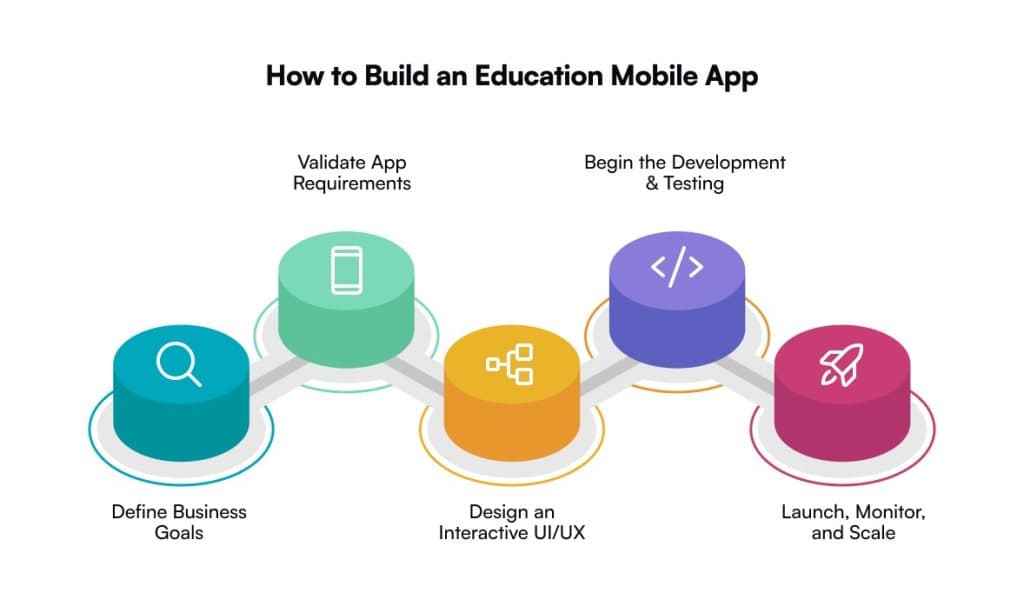
1. Define the Learning Model and Business Goals
Education apps don’t start with content. They start with people. Learners, trainers, or internal teams. First, get clear on who the app is built for and how they learn. Students preparing for exams. Professionals upskilling. Teams training at scale.
Then define the outcome. Courses, live classes, assessments, certifications, or internal training. Each choice changes the product direction. This clarity shapes the entire education app development process. It influences features, UX, content structure, and technology decisions.
2. Validate Features and App Requirements
Features should solve real learning problems. Do not copy competitors. Start by understanding what users actually need to progress. Learner roles, content formats, assessments, payments, progress tracking, and analytics.
Every feature should earn its place. If it doesn’t support learning outcomes or business goals, it doesn’t belong. This validation keeps the education app focused, usable, and scalable. Skip it, and feature overload slows development and hurts adoption.
3. Design a User-Centric UI/UX
Most education apps struggle here. Not because the content is weak, but because the experience feels heavy. Users get lost. Navigation takes effort. Onboarding feels slow.
Good UI/UX design removes friction. Clean flows. Simple screens. Clear progress. When learning feels easy to move through, engagement improves naturally. This is where UI/UX design services directly impact retention. No debate.
4. Choose the Right Tech Stack
The tech stack sets the limits of your app. Speed. Stability. Scalability. Everything depends on it. From mobile frameworks to cloud infrastructure, databases, and APIs.
Education platforms evolve fast. New content. New users. New learning formats. Many teams rely on custom software development to stay flexible and avoid rebuilding when growth kicks in.
5. Develop, Integrate, and Test the App
This is where planning turns into a real product. Frontend and backend move together. Integrations happen alongside development. Testing isn’t delayed. It runs in parallel.
Performance matters. Especially for video, live classes, and assessments. Strong mobile app development services make sure the app performs under real load, not just in demos.
6. Launch, Monitor, and Scale
Launch isn’t the finish line. It’s the starting point. Watch how users behave. Where they drop off. What they skip. Those signals guide what to fix next.
As usage grows, scale should feel planned, not rushed. More learners. More content. More traffic. Teams that think about this early scale smoothly. Others scramble later.
Must-Have Features to Include in Your Education App
Features decide whether users stay or silently leave. It’s rarely about more features. It’s about the right ones, built well.
- Live Sessions and Tutorials: Live sessions add real interaction to digital learning. Learners ask questions, instructors respond, and attention stays longer. Miss this, and learning starts to feel one-sided.
- Video-Based Content: Video content keeps learning flexible and easy to consume. Users pause, rewind, revisit. That freedom matters more than fancy visuals.
- Offline Mode: Offline access removes the internet from the equation. Lessons stay available even when networks don’t. Often overlooked. Usually regretted later.
- Push Notifications: Notifications bring users back when interest dips. Class reminders, progress nudges, missed sessions. Not too many, though. Nobody likes spam.
- Gamification: Gamification makes learning feel lighter. Points, badges, small wins. It’s not childish. It’s psychological, and it works when done right.
How Much Does an Education Mobile App Development Cost
Education app development cost is never a fixed number. If someone gives you a single figure, pause. It’s an oversimplification most times. The cost really depends on what you’re building. How complex the app gets. And how far you plan to scale from day one.
A basic learning app costs less, while a full LMS or a live tutoring platform can be a little expensive.
Long-term growth is another piece people miss. An MVP development just to test an idea costs less. That’s true. But apps designed for scale need stronger architecture, deeper testing, and reliable cloud setup. That’s where the cost increases.
Your goal should be to build cheaply. It’s to build something that doesn’t need rebuilding six months down the line.
Estimated Education App Development Cost Breakdown
| App Complexity | Estimated Cost Range | Estimated Timeline |
| Basic Educational App | $20,000 to $40,000 | 3 to 4 months |
| Medium Complexity App | $40,000 to $65,000 | 4 to 6 months |
| Advanced App with Features | $65,000 and above | More than 6 (or sometimes 9) months |
Note: These are estimated ranges. Final education app development cost varies based on design depth, platform choice (iOS, Android, or both), third-party integrations, and ongoing maintenance needs.

Tech Stack Used for Education App Development
Following is a list of the technologies used for developing an educational app, along with the emerging tech stack that you must know:
- Frontend (User Interface)
Cross-Platform: React Native, Flutter (single codebase for iOS & Android).
Web: React.js, Angular, Vue.js.
Native: Swift (iOS), Kotlin (Android) for platform-specific builds.
- Backend (Server-Side Logic)
Languages/Frameworks: Node.js (Express), Django (Python), Ruby on Rails, Spring Boot (Java).
- Databases (Data Storage)
SQL: PostgreSQL (robust, complex queries).
NoSQL: MongoDB (flexible, scalable for unstructured data).
Real-time: Firebase (quick setup, sync).
- Cloud & Deployment
Providers: Amazon Web Services (AWS), Microsoft Azure, Google Cloud Platform (GCP).
Services: Hosting, storage, machine learning, analytics.
Emerging Technologies Used for Education App Development
- Augmented Reality: AR brings learning into the real world. Users interact, not just read. Concepts stick better. Engagement stays high. A strong fit for modern education app development.
- Artificial Intelligence: AI makes education apps feel personal. It adapts to users. Recommends what to learn next. Tracks progress in real time with minimal guessing and better outcomes.
- Virtual Reality: VR creates fully immersive learning environments. Users learn by doing. No physical limits. Ideal for simulation-based education apps that demand a deeper understanding.
Why Businesses Must Create an Education App in Today’s Times?
Businesses can’t rely on traditional learning models anymore. Attention spans are shorter. Teams are working remotely. Learners expect access on demand. An education app gives businesses control over how knowledge is delivered, tracked, and improved.
Below are some of the top advantages of building an education app:
- On-Demand Learning Access: Learning happens on demand. Anytime. Anywhere. No fixed schedules. No location limits. Users learn when it actually fits their day.
- Scalable Knowledge Delivery: Content is built once, then reused. Updated easily. Scales as teams grow. Works for ten users or ten thousand.
- Measurable Learning Outcomes: Progress is visible. Performance is tracked. Completion rates tell you what’s working and what’s not. Decisions get clearer.
- Improved User Experience: Good UX removes friction. Navigation feels easy. Learning feels lighter. Users stay longer instead of dropping off.
- Supports Remote and Hybrid Teams: Distance doesn’t break learning. Everyone gets the same experience. Same content and same standards across different locations.
- Stronger Brand Authority: Structured education builds trust. It shows expertise. Over time, the brand becomes a learning authority, not just a provider.
The benefits are clear by now. But here’s the real truth. An education app only works if the experience works.
And this is where mobile app development services stop being optional. They shape how fast your education app runs, how easy it feels to use, and how well it scales as users grow.
Businesses that invest in tailored, user-first platforms don’t just teach. They scale knowledge.
Common Challenges While Developing an Education App
Education app development looks simple on paper. In reality, teams face challenges that directly impact adoption, cost, and long-term scalability.
- Balancing Content and Technology: Strong content alone isn’t enough. If the platform can’t support delivery smoothly, learning breaks and users disengage.
- User Engagement and Retention: Getting users to install the app is easy. Keeping users active is harder than getting installs. Consistency drops fast when learning feels heavy or repetitive. Most education apps lose users here, not at launch.
- Scalability and Performance Issues: Scalability becomes the real test. An app that runs fine for 100 users often breaks at 10,000. Slow load times. Crashes during sessions, and trust disappears quickly.
- Complex Feature Integration: Feature integration adds another layer of risk. Live classes, video streaming, payments, and analytics must move together. When they don’t, users feel friction before teams notice the problem.
- UI/UX Design Challenges: Learning apps carry a lot of information. If navigation feels heavy or confusing, users drop off without warning.
- Data Security and Privacy Compliance: Education apps deal with sensitive user data. Such as student records, payment details, and activity logs. If security is weak, trust breaks fast. Compliance risks follow. And reputational damage lasts longer than any feature release.
- Cross-Platform Compatibility: Users don’t stick to one device. They switch between iOS, Android, and web. Each platform behaves differently. Maintaining consistent performance across all of them adds complexity, but skipping it hurts experience and adoption.
- Cost and Timeline Overruns: Unclear requirements stretch timelines and budgets. Small planning mistakes early turn expensive later.
Education App Monetization Models to Generate Revenue
Building an education app is an investment. Monetization decides whether it grows or just exists. The right model depends on who you’re building for, how deep the content goes, and what scale you’re aiming for long-term.
- Subscription-Based Model: Users pay monthly or yearly for continuous access to learning. Revenue stays predictable. Planning becomes easier.
- Freemium Model: Entry stays free. Value builds trust. Advanced lessons, certifications, or tools unlock only when users are ready to pay.
- Pay-Per-Course Model: Learners pay only for what they need. Works well for niche skills and expert-led programs.
- In-App Purchases: Extra resources sit inside the app. Practice tests, downloads, or one-on-one sessions are added when users need them most.
- Corporate Licensing Model: Companies pay for team-wide access. Training scales faster without managing individual subscriptions.
- Certification and Assessment Fees: Knowledge turns into credentials. Learners pay for exams and verified proof that holds professional value.
- Ad-Based Model: Access stays free. Revenue comes from reach. Best suited for apps with high daily usage and large audiences.
- Marketplace Model: Experts sell. The platform takes a cut. More courses, more variety, and shared growth on both sides.
Popular Education Apps
Here is a list of some of the most widely used and downloaded education apps in today’s time:
- Duolingo
Designed for daily learning habits. Short, gamified lessons reduce friction and keep users consistent over time.
Known for: Gamified Learning Experience
Android Rating: 4.7
iOS Rating: 4.8
- Photomath
Built for instant problem-solving. Users scan equations, see step-by-step solutions, and understand the logic behind answers.
Known for: Camera Math Solver
Android Rating: 4.5
iOS Rating: 4.6
- Quizlet
Focused on revision and memory. Flashcards and practice tests help learners recall faster, especially before exams.
Known for: Flashcards and Practice Tests
Android: 4.5
iOS: 4.6
- BYJU’s
Structured for academic depth. Live classes and interactive content support guided learning across different education levels.
Known for: Live Classes and Interactive Sessions
Android: 4.2
iOS: 4.3
Conclusion
Education app development is no longer a side experiment. It’s a strategic move. It shapes how businesses teach. How they scale, compete in a market that’s already crowded, and are still growing. Choosing the right app type matters. So do features, process, cost, and the tech stack behind it. Every decision counts. Get it right, and the app grows. Get it wrong, and the struggle starts right after launch.
What stands out is this: education mobile app development works best when it’s planned end-to-end. Not rushed. Not copied.
This is where experience makes the difference. With years of hands-on expertise in education app development services, the team at Galaxy Weblinks helps businesses turn learning ideas into scalable digital products. From MVPs to enterprise-grade platforms, the focus stays the same. Build apps that users enjoy, and systems that scale.
Check our portfolio!
FAQs
1. How long does education app development usually take?
It depends on what you’re building. A basic education app or MVP can take 3–4 months. More advanced education mobile app development, like LMS or live tutoring platforms, usually takes 6 months or more.
2. What is the average cost of developing an educational app?
There’s no fixed price. Developing an educational app can cost anywhere between $20,000 to $65,000+, depending on features, complexity, and scalability needs. The more you plan for growth, the more it impacts cost.
3. Which platform should I choose for my education app, iOS or Android?
Most businesses choose both. Cross-platform education app development helps you reach more users faster while keeping costs under control. The right choice depends on your target audience and market.
4. What features are essential in education app development?
Core features include video-based content, live sessions, offline access, push notifications, and basic analytics. Without these, even well-designed education apps struggle with engagement and retention.
5. Why should I choose professional education app development services?
Because building is easy. Scaling isn’t. Professional education app development services ensure your app is secure, user-friendly, and ready to grow without performance issues or costly rework later.